Runtime Architecture
Choose a container according to who owns the serialized graph and who owns its runtime instance.
FlowGraphObject
In Unity, we use MonoBehaviour to add functionality to GameObjects in the scene.
In Flow, you can use FlowGraphObject and its inherited components to implement your game logic, such as character controllers, interactions, etc.
FlowGraphAsset
FlowGraphAsset is a ScriptableObject used to reuse FlowGraph. You can set the IFlowGraphRuntime type it plays at runtime.
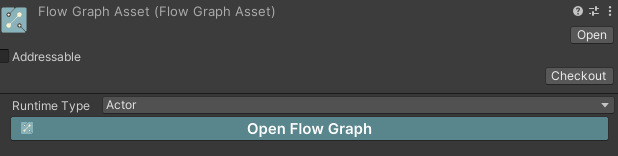
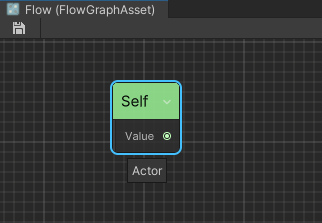
In Editor Mode, the graph editor will consider the owner of the Flow Graph to be the type you set, which is the Actor type as shown in the figure. Create Property/Self Reference node, you will see the port type is Actor.
FlowGraphInstanceObject
FlowGraphInstanceObject is a MonoBehaviour used to creating flow graph from FlowGraphAsset at runtime.
Here is an example, create a new class named TestInstanceObject:
using Ceres.Flow;
using Ceres.Flow.Annotations;
public class TestInstanceObject: FlowGraphInstanceObject
{
    [ImplementableEvent]
    public void Awake()
    {

    }
}
Create a FlowGraphAsset, set its Runtime Type to TestInstanceObject, open the graph, and implement Awake.
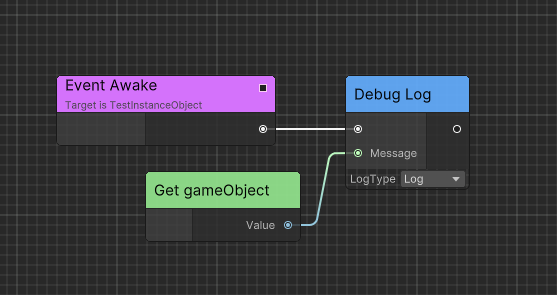
Create a new GameObject in scene and add TestInstanceObject component to the GameObject. Drag the FlowGraphAsset to the TestInstanceObject and you will see the Awake event is invoked after entering play mode.
FlowGraphScriptableObject
Beside the use of data sharing, ScriptableObject can also be used as a logic container. You can use FlowGraphScriptableObject to implement logic from ScriptableObject directly which is useful to create skill, state machine, buff, dialogue, etc.
Compared with FlowGraphAsset, FlowGraphScriptableObject owns an instance of FlowGraph at runtime.
Generated Runtime
FlowGraphAsset and [GenerateFlow(GenerateRuntime = true)] containers can use Generated C# Runtime when generated runtime is enabled for the graph.
See Code Generation for enabling generation, refreshing output, and resolving build validation failures.
Related guides
- Learn about Executable Events to understand how events trigger graph execution
- Explore Quick Startup for a practical example using FlowGraphObject
- Check Flow Concept for understanding Flow's core architecture
- See Debugging for debugging graph execution