Flow Concepts
Ceres Flow is an event-driven visual scripting layer built on the typed Ceres Graph model. A Flow graph starts execution from an event, calls C# functions through nodes, and runs inside a container that owns its runtime lifetime.
Read Ceres Architecture and Concepts first if you need the dependency boundary between Core, Graph, Flow, and Gameplay.
Events
An event is an entry point into an execution chain and may provide typed input values. Events can be declared by the graph or exposed from C#.
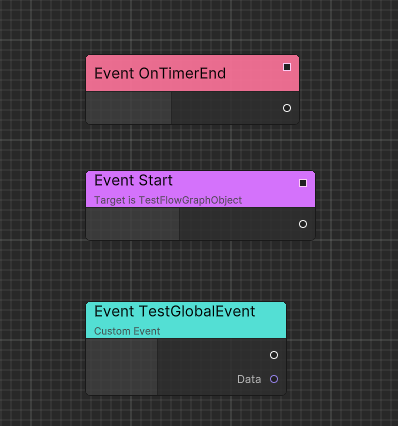
Use Executable Events to expose C# delegates or implementable methods. Graph-local behavior can use custom events without adding a C# declaration.
Functions
Function nodes call typed C# APIs. Ceres generates nodes for supported executable functions and function libraries, so graph ports follow the method's parameter and return types.
Use Executable Functions for instance APIs and Function Libraries for shared static APIs.
Containers
Every runtime Flow graph belongs to an IFlowGraphContainer. A container supplies the graph instance, execution context, and lifetime. It can be a custom MonoBehaviour or one of the container bases provided by Ceres.
Runtime Architecture describes the available container models and how graph assets become runtime instances.
Execution model
Flow combines two paths:
- Forward execution connects event and function nodes in the order they should run.
- Data dependencies are evaluated when an executing node needs an input value.
Start with Quick Start, then use Code Generation when a graph needs generated C# execution for a production or IL2CPP build.