Level
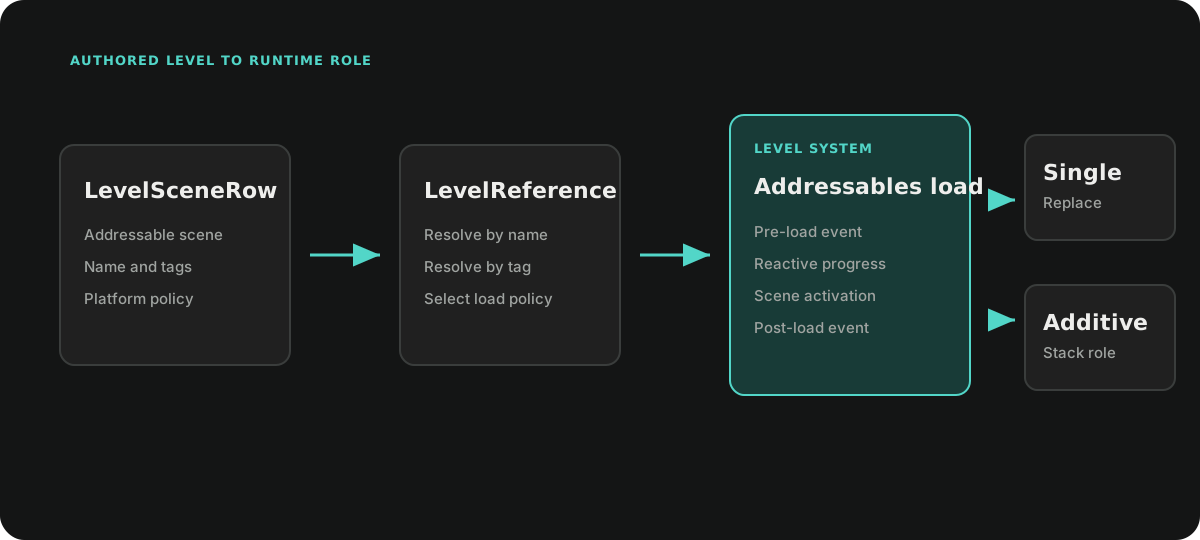
Ceres Level groups one or more Addressables scenes into a named gameplay level. LevelSceneRow defines scene membership and platform policy, while LevelSystem owns scene handles, load progress, notifications, and additive unloading.
Author a level table
Create a DataTable with LevelSceneRow as its row type. The row type automatically labels the table as LevelSceneTable, allowing LevelSceneDataTableManager to discover all level tables through Addressables.
Each row describes one scene:
levelNamegroups rows into oneLevelReference;referencestores the Addressables scene address;loadModeselectsSingleorAdditive;loadPolicyincludes or excludes the row on PC, mobile, or console;tagsprovide an alternate lookup path.
A level should contain at most one Single row. That scene becomes the base scene; all Additive rows with the same level name load on top of it.
Load a level
Resolve a level by name or tag, then await LevelSystem.LoadAsync.
using Ceres.Gameplay.Level;
using Cysharp.Threading.Tasks;
using R3;
using System;
using UnityEngine;

public static class LevelLoader
{
    public static async UniTask LoadGameplayAsync()
    {
        LevelReference level = LevelSceneDataTableManager.Get().FindLevel("Gameplay");
        if (level.Scenes.Length == 0)
        {
            Debug.LogError("Level 'Gameplay' was not found.");
            return;
        }

        using IDisposable progress = LevelSystem.LoadingProgress
            .Subscribe(value => Debug.Log($"Loading: {value:P0}"));

        await LevelSystem.LoadAsync(level);
    }
}
LoadAsync(string) performs the same lookup. Use an explicit LevelReference when code has already selected by tag or inspected the scene rows.
Load lifecycle
For a level with a Single row, LevelSystem:
- publishes
LevelPreloadand resetsLoadingProgressto0; - moves
CurrentLeveltoLastLeveland assigns the incoming reference; - loads the base scene in Single mode while keeping
GameWorldaccess valid across the scene transition; - loads the remaining Additive scenes in parallel and tracks their Addressables handles;
- sets progress to
1and publishesLevelPostLoad.
LoadingProgress is an R3 read-only reactive property. For multi-scene loads, each scene contributes an equal slot to the aggregate progress.
Levels containing only Additive rows do not change CurrentLevel or LastLevel, but they still publish the level load notifications.
Platform policy
LevelSceneDataTableManager evaluates LoadLevelPolicy while building its level references. Never excludes a row. Mobile and console use their matching flags; other platforms use PC.
Policy applies to DataTable discovery. A manually constructed LevelReference is not filtered again by LevelSystem.
Runtime additive scenes
Use LoadAdditiveByAddressAsync for content that is not represented by the level tables.
using Ceres.Gameplay.Level;
using Cysharp.Threading.Tasks;
using UnityEngine.SceneManagement;

public static async UniTask OpenRuntimeMap(string sceneAddress)
{
    LevelSystem.RegisterBaseScene(SceneManager.GetActiveScene());

    await LevelSystem.LoadAdditiveByAddressAsync(
        sceneAddress,
        setActiveAfterLoad: true,
        roleOverride: AdditiveSceneRole.RuntimeOverride);
}
Direct additive loading updates LoadingProgress and the additive stack. It does not change CurrentLevel or publish LevelPreload and LevelPostLoad.
Unload additive content
UnloadLastAdditiveAsync removes the most recent tracked scene, or the most recent entry matching a requested AdditiveSceneRole. Set restoreRegisteredBaseBeforeUnload when an override scene is active and the registered base scene must become active first.
bool unloaded = await LevelSystem.UnloadLastAdditiveAsync(
    restoreRegisteredBaseBeforeUnload: true,
    unloadOnlyRole: AdditiveSceneRole.RuntimeOverride);
Use UnloadRuntimeAdditiveStackAsync for the standard runtime primary/secondary stack, or UnloadAdditiveAsync to unload every tracked additive scene.
Ownership and constraints
- Scene references must be valid Addressables scene addresses.
LevelSceneRowvalidation rejects an empty address. LevelSystemowns the Addressables handles for tracked additive scenes. Do not release those handles separately.- Loading a new Single scene releases the previous additive handles because Unity unloads those scenes as part of the Single load.
- A failed direct additive load is removed from the stack and its handle is released.
LevelPreload,LevelPostLoad, andLoadingProgressare process-wide reactive streams; dispose subscriptions with their owner.[LevelName]can be applied to a string field to select known level names through the Editor drawer.
Related documentation
- World and Actors for
GameWorldownership during scene changes - Data Driven for DataTable authoring and validation
- Resource for Addressables-based runtime loading
- Reactive Integration for subscription lifetimes