Data Driven
The Data Driven module stores typed rows in DataTable ScriptableObjects and
loads those tables through the Ceres Resource system. Row schemas remain C#
types, while designers edit instances in the Inspector or Data Table window.
Use a Data Table for keyed, project-authored records such as items, levels, or characters. Use Configs for process-wide settings and live overrides.
Define a Row Schema
A row is a serializable class implementing IDataTableRow:
using System;
using Ceres.DataDriven;

[Serializable]
[AddressableDataTable(
    group: "GameData",
    address: "items",
    Labels = new[] { "runtime-data" })]
public sealed class ItemRow : IDataTableRow, IValidateRow
{
    public string displayName;
    public int maxStack = 1;

    public bool ValidateRow(string rowId, out string reason)
    {
        if (maxStack > 0)
        {
            reason = null;
            return true;
        }

        reason = "maxStack must be greater than zero";
        return false;
    }
}
IValidateRow is optional. The Editor calls it when a table is updated and logs
the returned reason when validation fails.
AddressableDataTableAttribute is also optional. When present, the Editor
registers Data Tables using that row type in the specified Addressables group.
The address defaults to the asset name when Address is omitted; labels come
from Labels.
Author a Table
- Create a Ceres > DataTable asset.
- Select
ItemRowas the row type. - Add rows and assign a unique row ID to each record.
- Edit inline or open the dedicated Data Table window from the asset Inspector.
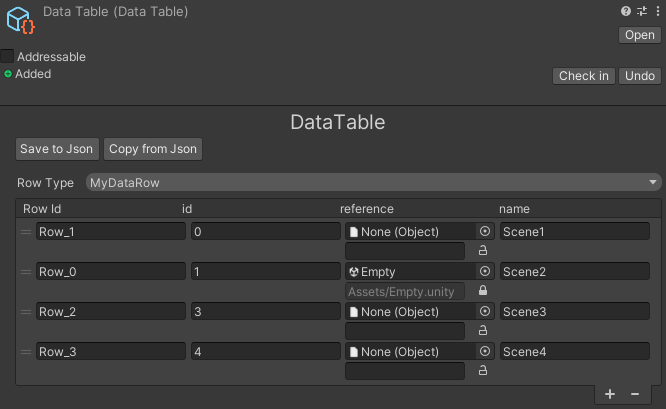
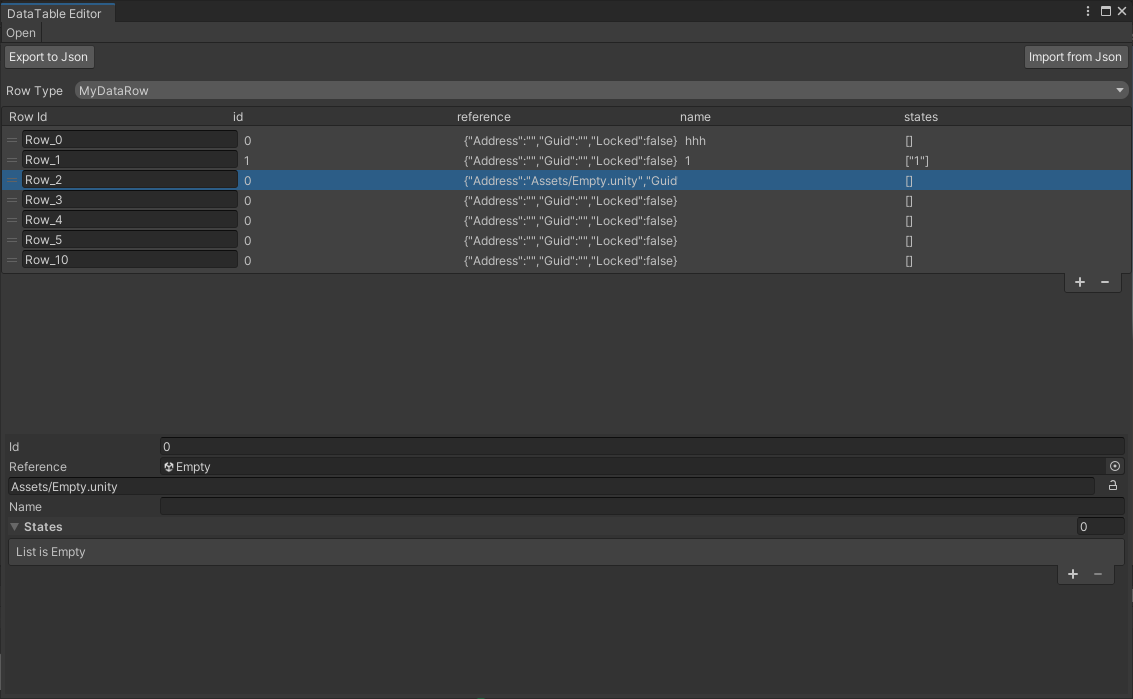
Changing the row type updates the serialized row metadata. Data Table editing supports Undo, JSON import and export, row validation, insertion, removal, and reordering.
Read Rows
DataTable exposes typed and untyped lookup APIs:
ItemRow potion = table.GetRow<ItemRow>("potion");
ItemRow first = table.GetRow<ItemRow>(0);
ItemRow[] stackable = table.GetRows<ItemRow>(row => row.maxStack > 1);
ItemRow[] all = table.GetAllRows<ItemRow>();
GetRow<T>(string) returns null when the ID is absent. Index-based access uses
the table's current order and throws for an invalid index. GetRowMap() creates
a dictionary keyed by row ID.
The returned rows are cached deserialized objects owned by the table. Treat
authored tables as read-only at runtime. Editor tooling that needs independent
copies can use DataTableEditorUtils.GetAllRowsSafe or GetRowMapSafe.
The public mutation API consists of AddRow, InsertRow, UpdateRow,
AddOrUpdateRow, RemoveRow, RemoveAllRows, and ReorderRow. AddRow and
InsertRow return false when the requested row ID already exists;
UpdateRow returns false when it does not exist.
Load Tables with a Manager
Derive from DataTableManager<TManager> to own a set of Addressable tables. A
concrete manager needs the public object constructor used by discovery.
using Ceres.DataDriven;
using Cysharp.Threading.Tasks;

public sealed class GameData : DataTableManager<GameData>
{
    public GameData(object _) : base(_) { }

    protected override UniTask Initialize(bool sync)
    {
        return InitializeSingleTable("items", sync);
    }

    public ItemRow GetItem(string rowId)
    {
        return GetDataTable("items")?.GetRow<ItemRow>(rowId);
    }
}
Initialize managers explicitly when their data is required:
await DataTableManager.InitializeAsync();
ItemRow item = GameData.Get().GetItem("potion");
InitializeAsync() first registers every discovered concrete manager, then
initializes the pending managers in parallel. Concurrent callers await the same
initialization, and managers from assemblies loaded later are added without
reloading managers that already completed. Initialize() uses the same
two-phase discovery with synchronous Addressables completion.
Get() is valid after initialization completes. It never enters synchronous
initialization while an asynchronous initialization is active. ReleaseAll()
invalidates the active initialization generation and clears the manager
registry, so late completions cannot publish stale state.
InitializeSingleTable loads through ResourceSystem. When
DataDrivenConfig.ValidateDataTableBeforeLoad is enabled, it first verifies the
address. A missing resource is ignored by the helper and the table remains unregistered.
Enable Initialize Managers in Project Settings > Ceres only when every manager should load before normal gameplay. Otherwise initialize the required managers from the project's own startup flow.
Editor Integration
DataTableEditorUtils is the supported entry point for custom Editor tools. It
can set row types, import or export JSON, create safe row copies, validate IDs,
and register Addressables entries. OnDataTablePreUpdate and
OnDataTablePostUpdate allow tooling to observe table edits.
For a custom window, derive behavior from DataTableEditorExtension and open it
with DataTableEditorWindow.OpenWindowWithExtensions. The Editor serializer is
selected in Project Settings > Ceres and defaults to
DataTableEditorJsonSerializer.
Related API: DataTable, DataTableManager, DataTableManager<TManager>, and DataTableEditorUtils.