Code Generation
This guide covers event bridging, function registration, and generating graph runtimes.
IL Post Process
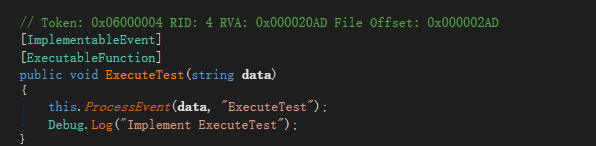
IL Post Process (ILPP) will inject IL to execute event into user's ImplementableEvent method body.
Below is the code decompiled using dnspy.
[ImplementableEvent, ExecutableFunction]
public void ExecuteTest(string data)
{
    Debug.Log("Implement ExecuteTest");
}
If you want to customize the timing for calling bridge methods, you can add bridge method explicitly as shown below.
[ImplementableEvent]
public void Test()
{
    var stopWatch = new Stopwatch();
    stopWatch.Start();
    this.ProcessEvent();
    stopWatch.Stop();
    Debug.Log($"{nameof(Test)} used: {stopWatch.ElapsedMilliseconds}ms");
}
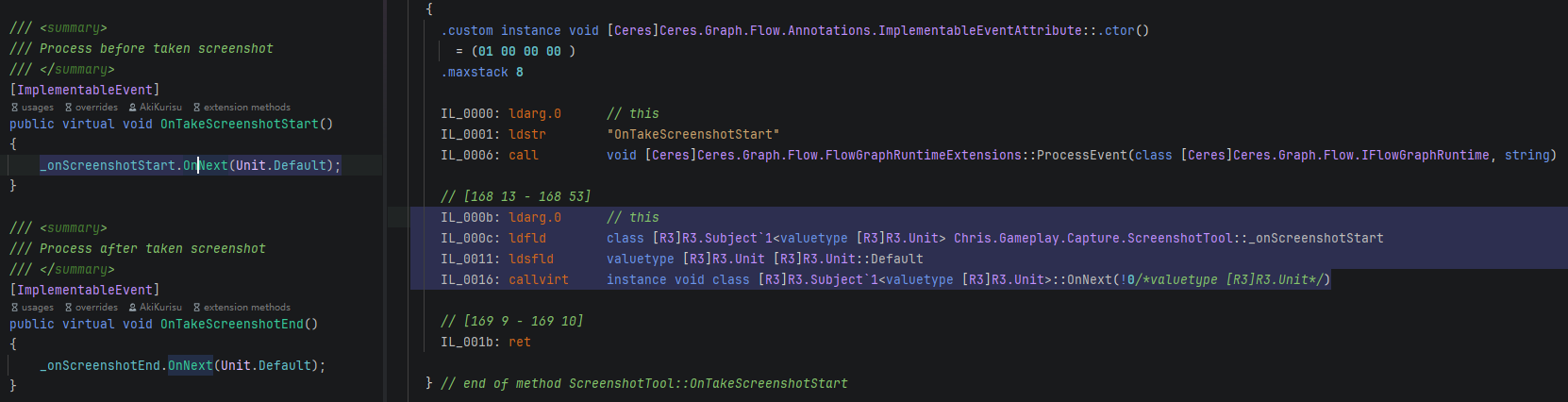
Recommended to use the newest version of Rider to view the IL code after ILPP directly.
Source Generator
In executable function part, it is mentioned that source generator will register static methods to improve runtime performance.
The following shows what SourceGenerator does.
Source code:
/// <summary>
/// Executable function library for ceres
/// </summary>
[CeresGroup("Ceres")]
public partial class CeresExecutableLibrary: ExecutableFunctionLibrary
{
    [ExecutableFunction, CeresLabel("Set LogLevel")]
    public static void Flow_SetLogLevel(LogType logType)
    {
        CeresAPI.LogLevel = logType;
    }

    [ExecutableFunction(ExecuteInDependency = true), CeresLabel("Get LogLevel")]
    public static LogType Flow_GetLogLevel()
    {
        return CeresAPI.LogLevel;
    }
}
Generated code:
[CompilerGenerated]
public partial class CeresExecutableLibrary
{
    protected override unsafe void CollectExecutableFunctions()
    {
        RegisterExecutableFunction<CeresExecutableLibrary>(nameof(Flow_SetLogLevel), 1, (delegate* <LogType, void>)&Flow_SetLogLevel);
        RegisterExecutableFunction<CeresExecutableLibrary>(nameof(Flow_GetLogLevel), 0, (delegate* <LogType>)&Flow_GetLogLevel);
    }
}
Generated C# Runtime
Generated C# Runtime compiles enabled Flow graphs into C# runtime programs. Use it when a graph needs generated execution, including production or IL2CPP builds.
Enable it from the Flow Graph Editor right-side Graph Inspector: turn on Generated C# Runtime, then click Generate C# Runtime.
You can also use menu commands:
Tools/Ceres/Flow/Generate C# Runtime/Selected AssetsTools/Ceres/Flow/Generate C# Runtime/Selected ObjectsTools/Ceres/Flow/Generate C# Runtime/All Enabled Assets
Generated sources are written to Assets/Ceres.Generated. Flow program files use the FlowProgram_*.generated.cs pattern, and a shared registry file maps generated program ids to their factories.
In Editor, missing or stale generated runtime can fall back to the normal graph runtime. In Build, an enabled graph with missing, stale, or unsupported generated runtime fails validation.
Custom Flow nodes must provide an editor codegen handler before they can be used by Generated C# Runtime.
Next Steps
- Learn about Function Library for detailed explanation of source generator usage
- Explore Executable Functions for using executable functions in Flow
- Check Ceres Code Generation for core library code generation
- See Executable Events for ILPP usage with events