Mod Packages
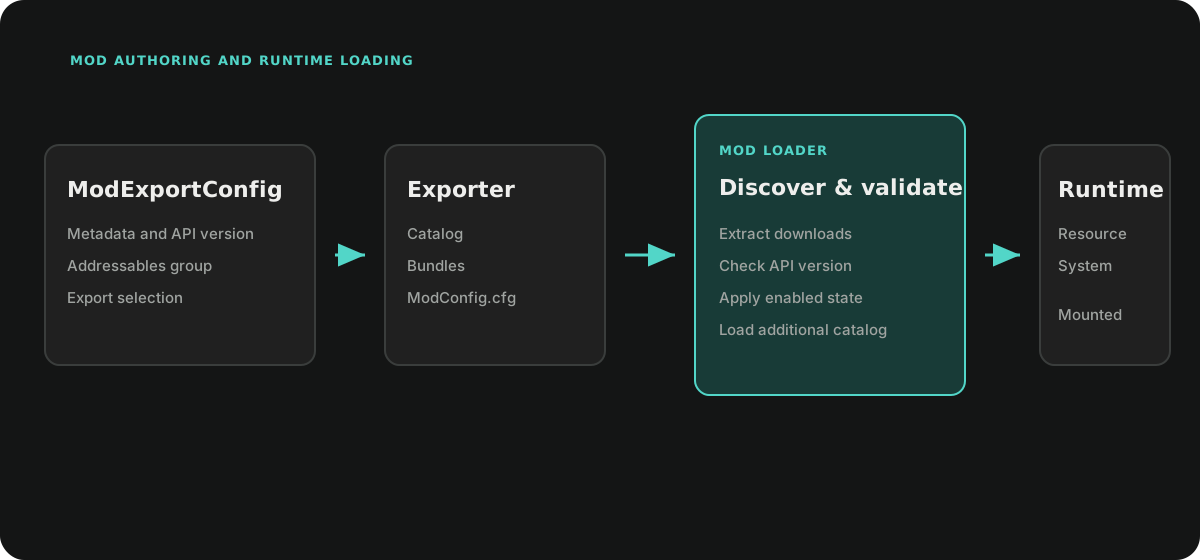
The Mod module exports selected Addressables groups and loads their catalogs
from an external directory at runtime. A package contains a catalog, its bundle
dependencies, and ModConfig.cfg metadata.
This workflow is group-driven. ModExportConfig delegates to the Resource
module's ResourceExporter and selects Addressables groups by name. It does not
use the graph-driven Content Pipeline, its scope
model, baselines, or update validation.
Authoring
Create an Export Configuration
Create Ceres > Mod > Export Config and set:
| Field | Purpose |
|---|---|
modName |
Package name and Addressables group prefix. |
version |
Author-defined package version. |
authorName |
Author metadata. |
description and iconData |
Optional catalog metadata. |
customBuilders |
Additional CustomBuilder steps. |
ModExportConfig is also a FlowGraphScriptableObject. Its
Flow_OnBuild(buildPath) event runs before the Addressables build, and
Flow_OnCleanup() runs during exporter cleanup.
Select and Export Groups
Open Tools > Ceres > Mod > Mod Exporter.
- Select the export configuration.
- Choose Create Addressable Group to create or update
Mod_<modName>. - Add the package assets to that group or another group whose name starts with the same prefix.
- Choose Export Mod.
CreateResourceExporter() builds the matching groups through
AddressableAssetBuilder, runs custom builders, writes ModConfig.cfg, and
post-processes the generated catalog so bundle locations resolve from the
package directory. The default exporter writes a zip below
Export/<BuildTarget> and removes the temporary build directory after zipping.
When exporting from the same source project as the Player, add
DefaultBundleNamePatchBuilder if built-in shader or MonoScript bundle names
could collide with the Player's bundles.
Custom builders derive from Ceres.Resource.Editor.CustomBuilder:
using System.IO;
using Ceres.Resource.Editor;

public sealed class LicenseBuilder : CustomBuilder
{
    public override string Description => "Write package license metadata.";

    public override void Build(ResourceExportContext context)
    {
        File.WriteAllText(
            Path.Combine(context.BuildPath, "LICENSE.txt"),
            "Project-owned license text");
    }
}
Cleanup runs in reverse builder order even when a later build step fails.
Runtime Loading
Initialize the API once from project startup:
using Ceres.Gameplay.Mod;

await ModAPI.Initialize(ModConfig.Get());
ModConfig.LoadingPath defaults to Mods beside the application on desktop and
in the Editor, and to Application.persistentDataPath/Mods on Android Players.
The default loader:
- Creates the loading directory when it does not exist.
- Extracts every zip found below it and deletes the zip.
- Reads package
.cfgmetadata intoModInfo. - Applies the stored
ModStatus. - Loads each enabled package directory through
ResourceSystem.LoadCatalogAsync.
After initialization, ModAPI.Initialized reports readiness, Refresh signals
state-list changes, and GetAllInfos() returns a copy of the discovered package
metadata. The list includes disabled packages; deleted packages are removed
from it.
API Validation
APIValidator accepts a mod only when its parsed apiVersion exactly equals
the configured API version. ModLoader.LoadModAsync applies that validator
before loading one catalog.
The current bulk LoadAllModsAsync path used by the default
ModAPI.Initialize does not invoke IModValidator. Projects that require API
validation for startup discovery must supply an IModLoader implementation
that validates every package before calling ResourceSystem.LoadCatalogAsync.
await ModAPI.Initialize(
    ModConfig.Get(),
    projectModLoader);
Validation covers version equality only. Package trust, signatures, dependency compatibility, and content policy belong to the project.
State Changes Apply on the Next Launch
EnabledMod and DeleteMod update ModConfig.States; they do not unload a
catalog that is already mounted. A disabled package stops loading on the next
initialization. A package marked Delete is removed from disk when the next
loader pass processes it.
Persist state changes explicitly:
ModAPI.EnabledMod(modInfo, isEnabled: false);
ModConfig.Get().Save();
ModAPI.DeleteMod(modInfo);
ModConfig.Get().Save();
Do not call DeleteModFromDisk after initialization unless the project has
already released every asset and catalog that may reference that directory.
States are keyed by ModInfo.FullName, which combines mod name, mod version,
and API version. Changing any of those values creates a different installed
identity. During initialization, states whose identity is no longer present are
removed from the in-memory config; save the config if that cleanup must persist.
Related API: ModAPI, ModLoader, ModConfig, and ModExportConfig.