Animation
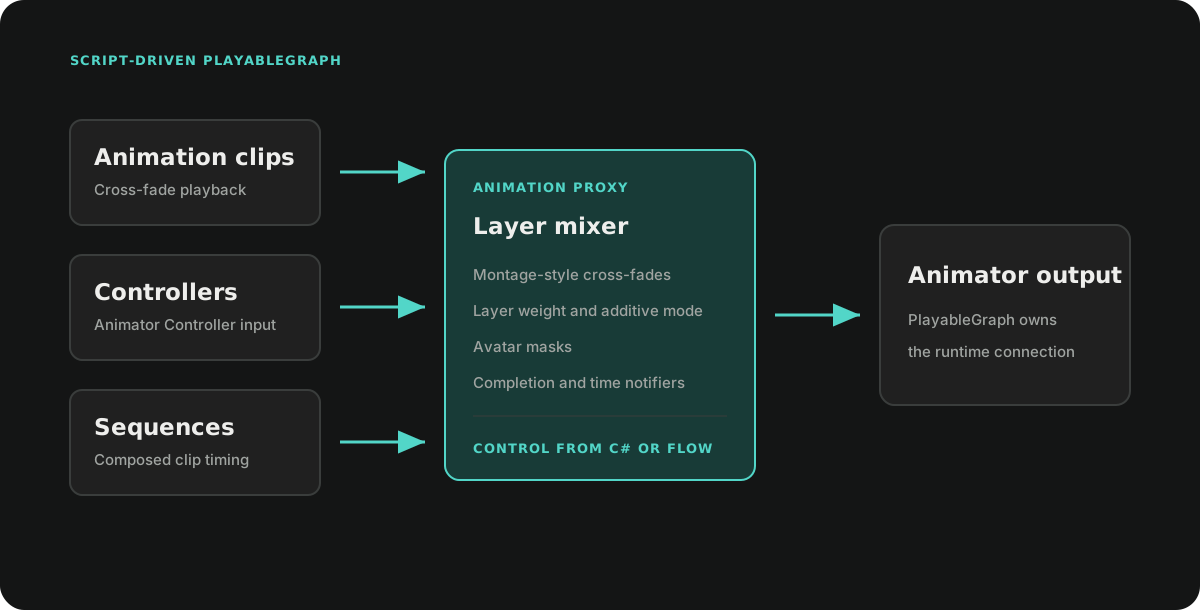
Ceres.Gameplay.Animations.AnimationProxy drives an Animator through a runtime PlayableGraph. It accepts existing AnimationClip and RuntimeAnimatorController assets, adds scripted cross-fades, layers, sequences, and notifications, and exposes the same operations to Flow.
AnimationProxy does not replace clip import, controller authoring, retargeting, or Unity's animation data. It owns the runtime graph that composes those assets.
Basic playback
Create one proxy for an Animator, retain it for the owner's lifetime, and dispose it when the owner is released.
using Ceres.Gameplay.Animations;
using UnityEngine;

public sealed class CharacterAnimation : MonoBehaviour
{
    [SerializeField] private Animator animator;
    [SerializeField] private AnimationClip idle;
    [SerializeField] private RuntimeAnimatorController locomotion;

    private AnimationProxy proxy;

    private void Awake()
    {
        proxy = new AnimationProxy(animator);
    }

    public void PlayIdle()
    {
        proxy.LoadAnimationClip(idle, blendInDuration: 0.2f);
    }

    public void PlayLocomotion()
    {
        proxy.LoadAnimator(locomotion, blendInDuration: 0.25f);
    }

    private void OnDestroy()
    {
        proxy.Dispose();
    }
}
The first load creates the graph. Later loads append a new playable and cross-fade from the previous leaf. Stop blends the graph out and, by default, restores the controller that was attached to the Animator when playback began.
ClearAnimatorControllerOnStart clears the Animator controller after a full-body proxy has blended in. RestoreAnimatorControllerOnStop controls whether the captured source controller is restored during stop. Set these properties before starting playback when the project needs different controller ownership.
Layers and masks
Create montage layers before the first clip or controller is loaded. Each layer has:
- a stable
LayerHandlederived from its name; - an output index;
- an optional
AvatarMask; - an override or additive blend mode.
Layer indices are used directly by the graph and should be unique and contiguous from zero.
using Ceres.Gameplay.Animations;
using UnityEngine;

LayerHandle upperBody = default;

proxy.CreateLayer(
    ref upperBody,
    layerName: "UpperBody",
    layerIndex: 0,
    additive: false,
    avatarMask: upperBodyMask);

proxy.LoadAnimationClip(reloadClip, 0.15f, upperBody);
Reusing a layer name with the same descriptor returns the existing layer. A layer descriptor cannot be changed while its montage is executing.
Sequences
CreateSequenceBuilder composes timed clip or controller steps into a pooled SequenceTask. A step duration controls when the sequence advances; it does not modify the source clip speed.
using Ceres.Gameplay.Animations;
using Ceres.Tasks;

using var builder = proxy.CreateSequenceBuilder();

SequenceTask sequence = builder
    .Append(introClip, introClip.length, blendInDuration: 0.1f)
    .Append(loopClip, loopClip.length * 3f, blendInDuration: 0.2f)
    .SetBlendOut(0.25f)
    .Build()
    .Run();

// Retain sequence and Dispose it after completion.
// If its owner cancels first, call Stop followed by Dispose.
AppendCallBack attaches work to completion of the preceding step. Build(existingSequence) appends the generated steps to an existing SequenceTask. Dispose the builder after Build. Build acquires the returned pooled sequence for the caller, so the caller must dispose that reference after completion or cancellation.
Notifications
AnimationNotifier fires when a leaf playable crosses a normalized time. AnimationStateNotifier additionally requires an Animator Controller state hash. Notifications are evaluated during a scheduled LateUpdate tick.
using Ceres.Events;
using Ceres.Gameplay.Animations;

var notifier = new AnimationNotifier(layer: 0, normalizedTime: 0.5f);
EventCallback<AnimationNotifyEvent> callback = evt =>
{
    if (evt.Notifier == notifier)
    {
        SpawnFootstep();
    }
};

proxy.AddNotifier(notifier);
proxy.RegisterNotifyCallback(callback);

// Remove both registrations when they are no longer needed.
proxy.RemoveNotifier(notifier);
proxy.UnregisterNotifyCallback(callback);
A negative normalized time makes the base notifier eligible on every event tick. Use a non-negative threshold for one notification per loop crossing, or subclass AnimationNotifier for a different predicate.
Flow integration
AnimationProxy methods marked as executable functions are available directly to Flow. The gameplay integration includes nodes for:
- loading clips and controllers, stopping, and querying the active leaf;
- playing a clip for a loop count with optional completion output;
- creating masked or additive montage layers;
- adding and removing animation notifications;
- accessing Animator Controller parameters through
AnimatorControllerInstanceProxy.
The convenience sequence nodes operate on the default proxy layer. Ceres also registers Flow conversions between LayerHandle, int, and string.
Lifetime contract
- One proxy owns one generated PlayableGraph at a time.
Stopperforms playback transition and optional source-controller restoration.Disposestops tracked sequences, cancels notifier ticking, clears notifier state, and destroys the graph immediately. It does not run the normal controller-restoration path.- Do not use leaf playables, montage nodes, or instance proxies after the owning AnimationProxy is disposed.