Configs
The Configs module provides typed, process-wide configuration backed by layered config files. Project defaults, platform files, packaged files, and persistent files all enter the same provider pipeline.
Use it for settings that must be available before scene content loads or must be overridden without replacing an entire configuration file. It is not a general asset database; use ScriptableObjects or Data Tables for authored content with Unity object references.
Define and Read a Config
Derive from Config<TConfig> and optionally assign a two-part path with
ConfigPath. The first part selects the file and the second part selects the
entry within that file.
using System;
using Ceres.Configs;

[Serializable]
[ConfigPath("Game.Combat")]
public sealed class CombatConfig : Config<CombatConfig>
{
    public float criticalDamage = 2f;
    public int maxCombo = 10;
}
Read the cached instance through the config type:
var combat = CombatConfig.Get();
float multiplier = combat.criticalDamage;
Without ConfigPath, Ceres uses the type name as a root config. For
Game.Combat, Config<CombatConfig>.ParentPath is Game, Name is Combat,
and the file key is Game.cfg.
Config<TConfig>.Get() returns a shared cached instance. If no provider contains
the requested entry, Ceres creates new TConfig() and caches it.
Providers and Precedence
ConfigSystem asks registered IConfigFileProvider instances for the same
ConfigFileLocation, then merges the resulting IConfigFile values. Providers
are evaluated from the highest numeric priority to the lowest. When two sources
contain the same property, the value already supplied by the higher-priority
provider is retained.
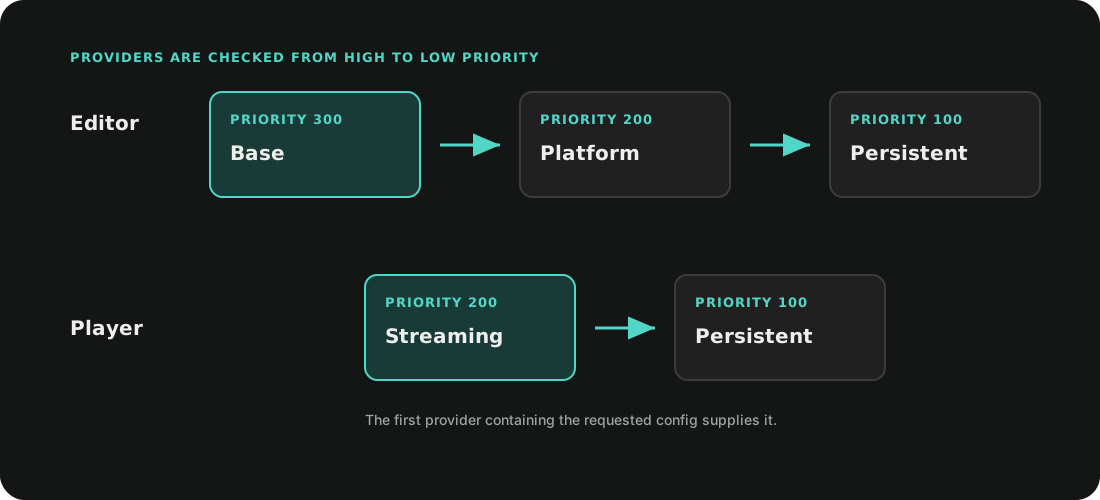
The built-in providers are:
| Environment | Priority | Source |
|---|---|---|
| Editor | 300 | Project-wide files under Configs/ |
| Editor | 200 | Build-target files under Configs/<BuildTarget>/ |
| Player | 200 | Packaged or extracted streaming config files |
| Editor and Player | 100 | Persistent files under Saved/Configs/ |
Register a project-specific source before the first config is requested:
using Ceres.Configs;

public sealed class RemoteConfigProvider : IConfigFileProvider
{
    public bool TryGetConfigFile(
        ConfigFileLocation location,
        out IConfigFile configFile)
    {
        // Resolve an IConfigFile owned by the project.
        configFile = null;
        return false;
    }
}

ConfigSystem.RegisterConfigFileProvider(
    new RemoteConfigProvider(),
    priority: 250);
Provider registration does not invalidate values that have already entered the
config caches. Register providers during startup, before calling Get().
ConfigSystem.GetConfigFile(location) returns the merged view including
persistent data. GetProjectConfigFile(location) skips the persistent provider
and rebuilds the project-only view without using the merged-file cache.
Save Runtime Overrides
Calling Save() writes the current config entry through
ConfigsModule.PersistentSerializer:
var combat = CombatConfig.Get();
combat.maxCombo = 12;
combat.Save();
Use Save(SaveLoadSerializer) when the project owns the destination serializer.
Saving updates the entry inside its config file; other entries sharing the same
file are preserved.
Config payloads use Unity JsonUtility by default. Apply
PreferJsonConvertAttribute to a config class when it requires Newtonsoft.Json
features such as dictionaries:
using System;
using System.Collections.Generic;
using Ceres.Configs;
using Ceres.Serialization;

[Serializable]
[PreferJsonConvert]
[ConfigPath("Game.Loot")]
public sealed class LootConfig : Config<LootConfig>
{
    public Dictionary<string, float> weights = new();
}
The persistent stream formatter is selected in Project Settings > Ceres.
Changing ConfigsModule.ConfigSerializer resets the persistent serializer and
clears the config caches.
Live Config Variables
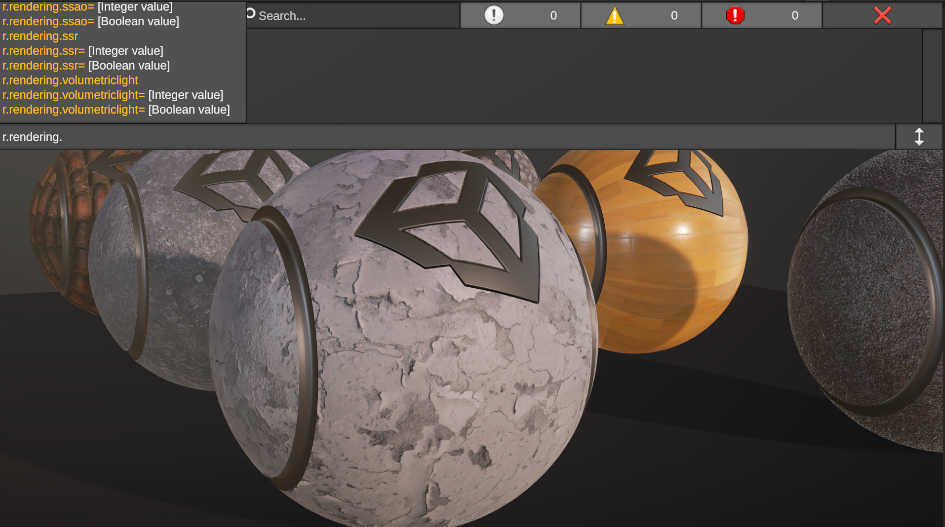
ConfigVariableAttribute exposes an instance field or read-write property to
the runtime variable registry. Supported value types are int, float, bool,
and string; the same values can be wrapped in R3.ReactiveProperty<T>.
using System;
using Ceres.Configs;
using R3;

[Serializable]
[ConfigPath("Game.Combat")]
public sealed class CombatConfig : Config<CombatConfig>
{
    [ConfigVariable("combat.maxCombo")]
    public int maxCombo = 10;

    [ConfigVariable("combat.damageScale")]
    public ReactiveProperty<float> damageScale = new(1f);
}
Query and change variables through ConfigVariableRegistry:
var variables = ConfigVariableRegistry.Get();

if (variables.TryGetVariable("combat.maxCombo", out var variable))
{
    variable.SetValue(12);
}
SetValue converts compatible input values, changes the cached config, and
saves it. Variable names are global; duplicate names are rejected. Set
IsEditor = true on the attribute to omit a variable from Player builds.
The registry discovers concrete Config<TConfig> types in Ceres and in loaded
assemblies that reference it. GetAllVariables, GetVariable, and HasVariable
provide the read-side registry API.
Build and Storage Contract
The Editor stores project configuration as text .cfg files. Before a Player
build, Ceres exports the project files to StreamingAssets/Configs; platforms
that cannot read that directory directly receive a Configs.zip archive. The
runtime extracts the archive before modules are initialized.
Persistent configuration is stored below SaveUtility.SavePath/Configs. Treat
the generated streaming files and persistent files as implementation data; use
the config APIs instead of editing them while the application is running.
Related API: Config<TConfig>, ConfigSystem, IConfigFileProvider, and ConfigVariableRegistry.